My Journey Running AI Locally: Dell Pro Max GB10 Experiments
Last time I wrote about pushing my M4 Pro to its limits and teasing what might come next. That next thing arrived: a Dell Pro Max GB10 I could use for a month, courtesy of Willem. It is basically a DGX Spark, but in a Dell chassis. Finally, a machine with enough GPU power and VRAM to run the models I’ve been watching from afar.
The goal was simple: run more powerful models and see what kind of tokens-per-second I could squeeze out. What followed was a month of trial and error, frustration, and finally a setup I could actually use to get work done. Here’s the full story.
The Hardware
The Dell Precision Max Pro GB10 is a workstation-grade server built for AI workloads. It comes with a blackwell-grade GPU and enough VRAM to run 120B class models. However, it is also very similar to my MacBook in the sense that it works with Unified Memory with equal bandwidth of 273GB/s. In theory this means I can run models at exactly the same tokens-per-second as on my MacBook. I knew that software support on NVIDIA hardware was gonna be a lot better. But which software stack should I use to squeeze the most performance out of this box?
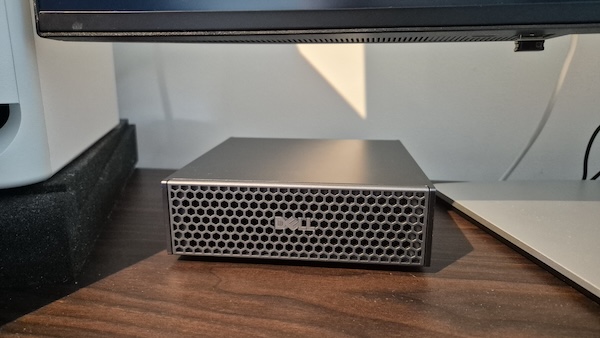
The Dell Pro Max fits right on my desk
Attempt 1: LM Studio Server (LMSter)
My first instinct was to try LM Studio Server (lmster), since I already knew the LM Studio ecosystem from my Mac experiments. I figured the workflow would be familiar, maybe a bit different on Linux, but manageable.
It wasn’t. The server version of LM Studio feels a lot less polished.
Downloading models through lmster was a hassle. There is a model browser, but it only offers a handful of models out of the box. Also it doesn’t let you pick a quantization variant, just the base model. That way I ended up downloading models in FP16, without an MTP head, so I missed performance. That’s why I ended up downloading models manually from HuggingFace anyway. Once a model was loaded, the server worked, but configuration options were limited. Since the Dell box runs on Linux I could enable MTP for the first time (as I explained in my last blog it isn’t implemented for MLX in llama.cpp on MacOS). But other improvements were missing… For example I learned about flash-attention, giving more performance on large contexts. But the option is missing in LMster. I couldn’t tune the model the way I wanted, and that lack of configurability was a dealbreaker for chasing performance.
lms server start --port 1234 --bind 0.0.0.0

lms load Qwen3.8-27B \
  --context-length 1000000 \
  --gpu max \
  --speculative-draft-mtp \
  --identifier qwen3.8-27b
The result: 20 tokens per second. Which is better than the 11 tokens per second I got on my M4 Pro, but I was hoping for more. The main bennefit was that I could now enable MTP, which I couldn’t do on my Mac.
The setup is pretty easy (once the right model is downloaded). However, LMSter felt like a stepping stone, not a destination. It got a model running, but it wasn’t a great experience, and it was clearly less configurable than what other solutions offer. Time to move on.
Attempt 2: Llama.cpp
Next I tried llama.cpp, the actual core of LM Studio. It’s highly configurable, supports a wide range of quantization formats, and I knew it could push hardware close to its limits on my Mac.
On the GB10, I was hopeful. I loaded Qwen3.8-27B with llama.cpp, enabled features like -fa (flash attention), and crossed my fingers.
llama-server \
  -m ~/models/unsloth/Qwen3.8-27B-GGUF/Qwen3.8-27B-UD-Q4_K_XL.gguf \
  --mmproj ~/models/unsloth/Qwen3.8-27B-GGUF/mmproj-BF16.gguf \
  --alias qwen3.8-27b \
  --spec-type draft-mtp \
  --spec-draft-n-max 3 \
  --api-key xxx \
  -ngl 99 -ngld 99 \
  -fa on \
  --cache-type-k q8_0 --cache-type-v q8_0 \
  -c 1000000 \
  --rope-scaling yarn \
  --rope-scale 4 \
  --yarn-orig-ctx 262144 \
  --threads 12 --threads-batch 12 \
  --host 0.0.0.0 --port 9876
As you can see the setup is more complex than LMster, but it gives you a lot more control over the model and its performance. You can tweak memory usage, context length, and other parameters to get the best performance out of your hardware. LMSter sets these parameters for you, but it doesn’t let you change them. Llama.cpp does.
The result: 20 tokens per second.
That was… fine. Better than my M4 Pro, sure, but this is a machine that costs many times as much and has vastly more VRAM. 20 tps felt like leaving performance on the table. Llama.cpp itself was stable and configurable, but the throughput numbers told me there was more to extract with a different approach.
I also noticed vision wasn’t working with the Qwen model like it did in LMster (even with the exact same model image). I turns out a specific vision image needs to be loaded.
Attempt 3: vLLM
This is where things got complicated, interesting and rewarding. I found out about vLLM, a high-performance inference engine for LLMs. It promised better throughput than llama.cpp, especially on enterprise hardware like the GB10. Its main selling point is that it is designed for high-throughput inference, making it more suitable for a server environment where you want to maximize tokens per second over multiple concurrent requests.
I started with a simple command to serve a model:
vllm serve bullpoint/Qwen3-Coder-Next-AWQ-4bit \
  --port 8000 \
  --enable-auto-tool-choice \
  --tool-call-parser qwen3_coder
It worked, but I felt it could be better. Every setting in vLLM has a performance impact, and the defaults are not always optimal for every model. I had to experiment with settings like --max-num-seqs, --enable-prefix-caching, and --enable-chunked-prefill to get the best throughput.
The Setup Struggles
vLLM does work out of the box. But you will quickly run into trouble using the model. You need to understand which settings matter:
- Tool calling: Each model handles tool calling different. vLLM has a setting for a tool calling template. If you forget to set this setting the model will just fail to call tools at runtime.
- Load times: Where llama.cpp just takes 30 seconds to load, vLLM takes minutes. It does a lot of optimizing and takes all the RAM it can. This makes “just in time loading” very impractical. Also testing different settings takes a long time, if changing a setting means 5 minutes of loading before the model can be tested.
- Default settings: Some settings are automatically set by vLLM, and overriding them could even hurt your performance. For example Flash Attention
--attention-backend FLASH_ATTNmight seem like a good idea, but vLLM uses FlashInfer attention which is better than Flash Attention. You need to know which settings to override and which to leave alone.
Every decision had consequences. Get the memory settings wrong and vLLM would consume all available RAM, crash running apps, and leave you staring at a frozen desktop. I learned this the hard way.
All of these settings weren’t clearly documented for the Qwen models. There are some cookbooks out there, but they are often outdated or for different models. I had to piece together the right combination of settings through trial and error.
vllm serve unsloth/Qwen3-Coder-Next-FP8 \
  --port 8000 \
  --enable-auto-tool-choice \
  --tool-call-parser qwen3_coder \
  --max-num-seqs 4 \
  --enable-prefix-caching \
  --enable-chunked-prefill \
  --max-num-batched-tokens 8192 \
  -q fp8
This already gave me better performance, especially with multiple concurrent streams. But I still wasn’t hitting the numbers I wanted. Also it kept outputting unrelated warnings to the console Failed to check the 'should dump' flag on TCPStore... Broken pipe every second, which was a bit annoying. It has to do with multi GPU setups which I didn’t use. That’s why I ended up disabling the NCCL monitoring with TORCH_NCCL_ENABLE_MONITORING=0. It seems to be a known issue with vLLM, but it didn’t affect performance.
The breakthrough: NVFP4
Once I had vLLM working correctly, I discovered NVFP4 quantization. It is Nvidia’s native 4-bit format optimized for their GPUs. This isn’t a general-purpose quantization like AWQ or GPTQ; it’s specifically tuned for Nvidia blackwell hardware, which means the kernels are optimized for the exact architecture in the GB10.
TORCH_NCCL_ENABLE_MONITORING=0 vllm serve unsloth/Qwen3.8-27B-NVFP4 \
  --max-model-len 262144  \
  --gpu-memory-utilization 0.70 \
  --tensor-parallel-size 1 \
  --trust-remote-code \
  --kv-cache-dtype fp8 \
  --reasoning-parser qwen3 \
  --enable-auto-tool-choice \
  --max-num-batched-tokens 4096 \
  --tool-call-parser qwen3_coder \
  --speculative-config '{"method": "mtp", "num_speculative_tokens": 2}' \
  --enable-prefix-caching \
  --api-key xxx \
  --port 8000
With NVFP4, Qwen3.8-27B on vLLM hit 30 tokens per second on a single stream, and significantly higher throughput with multiple streams. Prefill also became much faster, and the model was able to handle more concurrent requests without running out of memory.
I ended up using Qwen3.8-27B in NVFP4 format for the rest of my experiments. It was the best combination of model intelligence and quantization for the GB10 hardware. I was able to use it in open code on my mac and also experimented with running a Hermes agent 24/7 on a VM using the Dell box as the LLM provider. It was quite a fun experiment to see how well the model could handle continuous requests and tool calls, and it performed admirably. It finally felt like I was using a cloud service provider instead of experimenting on a local machine! But the speed was still a lot slower than I am used to with cloud providers like Github Copilot. A large prompt could take hours to complete on xhigh thinking mode…
Lessons Learned
After a month of cycling through tools, I’ve distilled a few hard-won lessons that I wish I’d known before starting:
1. Larger model != better intelligence
I tried multiple models on the 128GB of RAM available on this box. I could finally run medium size models (120B parameters) instead of the small models fitting on my Mac. A few models I tried:
- gpt-oss-120b (4-bit)
- laguna-s-120b (4-bit)
- nemotron-3-super-120b (4-bit)
- deepseek-v4-flash (2-bit)
However, I was not quite impressed with these models. It was to be expected of the older GPT OSS model. It is a year old which is an eternatiy in LLM world! But the newer laguna and nemotron models also weren’t as good as I expected. I was mainly missing vision capability that I got used to from the Qwen models. Otherwise they seemed to perform on-par with Qwen3.6-27B, with similar t/s.
Here’s how they stack up on the benchmarks that matter for coding work. I swapped out MMLU-Pro for the Artificial Analysis Intelligence Index (a composite of nine evaluations spanning coding, science, reasoning, and professional tasks) since it’s independently tracked across vendors rather than a single vendor-reported academic score, and added a vision column since that’s what I actually missed day-to-day:
| Model | Params (Active) | SWE-bench Pro | SWE-bench Verified | Terminal-Bench 2.1 | AA Intelligence Index | Vision |
|---|---|---|---|---|---|---|
| Qwen3.6-27B | 27B full | — | 77.2% | 59.3% | 29 | Yes |
| Qwen3.8-27B | 27B full | 61.7% | - | 73.0% | 52 | Yes |
| GPT-OSS-120B | 117B (5.1B) | 16.2% | 62.4% | — | 24 | No |
| Poolside Laguna-S | 118B (8B) | 59.4% | - | 70.2% | — | No |
| Nemotron-3-Super-120B | 120B (12B) | - | 60.47% | — | 26 | No |
| DeepSeek-V4-Flash | 284B (13B) | 52.3% | 79.0% | 82.7 | 52 | Yes |
* All figures are vendor-published or Artificial Analysis’s own runs, not independently reproduced by me.
The pattern is clear: none of these 120B-class models beat Qwen3.8-27B (or even Qwen3.6-27B) on any benchmark, despite having many times the parameters.
I also tried DeepSeek-V4-Flash-Vision. It is an impressive model, even outperforming Qwen3.8-27B, but it is a huge model so I could only fit it on this machine in 2-bit quantization. That made it a bit crippled, however it still outperformed Qwen3.8-27B. And even at 2-bit quantization it took almost all my available RAM (96gb), leaving little room for context. I think one would need at least 2 of these machines to run the model in 4-bit and with enough context length. That made it impractical for my use case.
After Qwen3.8-27B was released it made no sense to use the larger models anymore, since Qwen3.8-27B outperforms them on all benchmarks. The lesson here is that having more RAM, doesn’t equal running better models. At least with the current set of models available in this range. Maybe in the future better models in the 120B range will be released. But they seem to be released less frequently than the smaller models. It is logical since the focus lies mainly on letting as many people run their models, and having 128GB of RAM is quite a luxury in 2026.
If you’re thinking of buying a machine with 128GB of Unified RAM, think about what kind of models you want to run on there. It might be better to get a machine with less, but faster RAM so you can run the Qwen3.8 model with more performance.
2. Use the correct Quantization for your hardware
This was the biggest revelation. NVFP4 (Nvidia FP4) is the quantization format that matters if you’re running on Nvidia hardware. It’s not just a smaller number, it’s a quantization format with kernels specifically optimized for Nvidia’s GPU architecture.
For AMD GPUs, the equivalent is ROCM FP (ROCMPF). Using the wrong quantization format means you’re running suboptimal kernels, which directly translates to lower tokens per second.
General-purpose quantizations like AWQ, GPTQ, or even standard 4-bit GGUF will work, but they won’t extract the maximum performance your hardware can deliver. Know your hardware, then use the quantization format designed for it. At this moment there is no specific quantization format for Apple Silicon, but I expect that to change in the future.
3. vLLM is powerful but demanding
vLLM gave me the best performance by a wide margin: 30 tps vs 20 tps from llama.cpp. But the setup complexity was genuinely frustrating. You need to understand memory management, context window trade-offs, and the specific configuration requirements of your model. It’s not a “download and run” tool. If you’re willing to put in the effort, the performance payoff is substantial. If you want something that just works, llama.cpp (or even lmster for basic use) is the better choice.
I also read about SGlang which is a competitor to vLLM. It is a new inference engine that promises even better performance than vLLM. I didn’t have time to test it, but it seems they prioritize single stream performance over multi-stream throughput. It might be a better fit for people using it for personal use, but I think vLLM is still the best choice for server setups where you want to maximize throughput across multiple concurrent requests.
Conclusion
The Dell Pro Max GB10 proved it has the raw horsepower to run large models at impressive speeds. The interesting part is that the hardware is pretty similar to my MacBook in terms of Unified Memory bandwidth, but the software ecosystem on Linux, particularly with vLLM and NVFP4, allowed me to extract significantly more performance. This bodes well for the future of Mac, there is a lot of potential for Apple Silicon to catch up in the future with custom quantizations and better software support. But for now, if you want to run large models at cloud-competitive speeds, Linux (and NVIDIA) with the right software stack is still the way to go.
vLLM with NVFP4 gave me the best numbers: 30 tokens per second with Qwen3.8-27B. But getting there took a month of trial and error, multiple failed configurations, and more than a few moments of questioning my life choices when tool calling failed again and again. The lesson is clear: if you want to run large models locally, be prepared to invest time in understanding the software stack, the model’s requirements, and the hardware’s capabilities. It’s not plug-and-play, but the rewards are worth it.
I also learned faster memory to be worth more than having more memory. At 30 t/s the speed is not there for actual hands on coding work. It’s fine for background tasks, but I definitely need faster output for a live coding session. The GB10 has 128GB of Unified Memory, but the Qwen3.8-27B model is so efficient that it doesn’t need all that RAM to run well. A machine with faster RAM and less capacity might have been a better choice for my use case. Of course this explains why graphics cards with 24GB or more of VRAM are so pricey these days. A single RTX 5090 costs as much as a Dell Pro Max GB10, while having only 32GB of VRAM. I’m thinking of shopping for a machine myself, and I will definitely prioritize faster RAM over more RAM.
Next Up
There are coming out new models every day, and new techniques for running them. Recently Qwen released a preview of its Qwen4 architecture. It works with n-gram weights that can be offloaded to SSD. This is a new technique that allows running larger models on more affordable hardware. I will be experimenting with this in the coming weeks, and will report back on my findings. Stay tuned!